Your WhatsApp contacts. Beautifully organized.
Stop typing numbers one by one. Export thousands of group members to clean spreadsheets in seconds. Powerful community analytics. Effortless outreach.
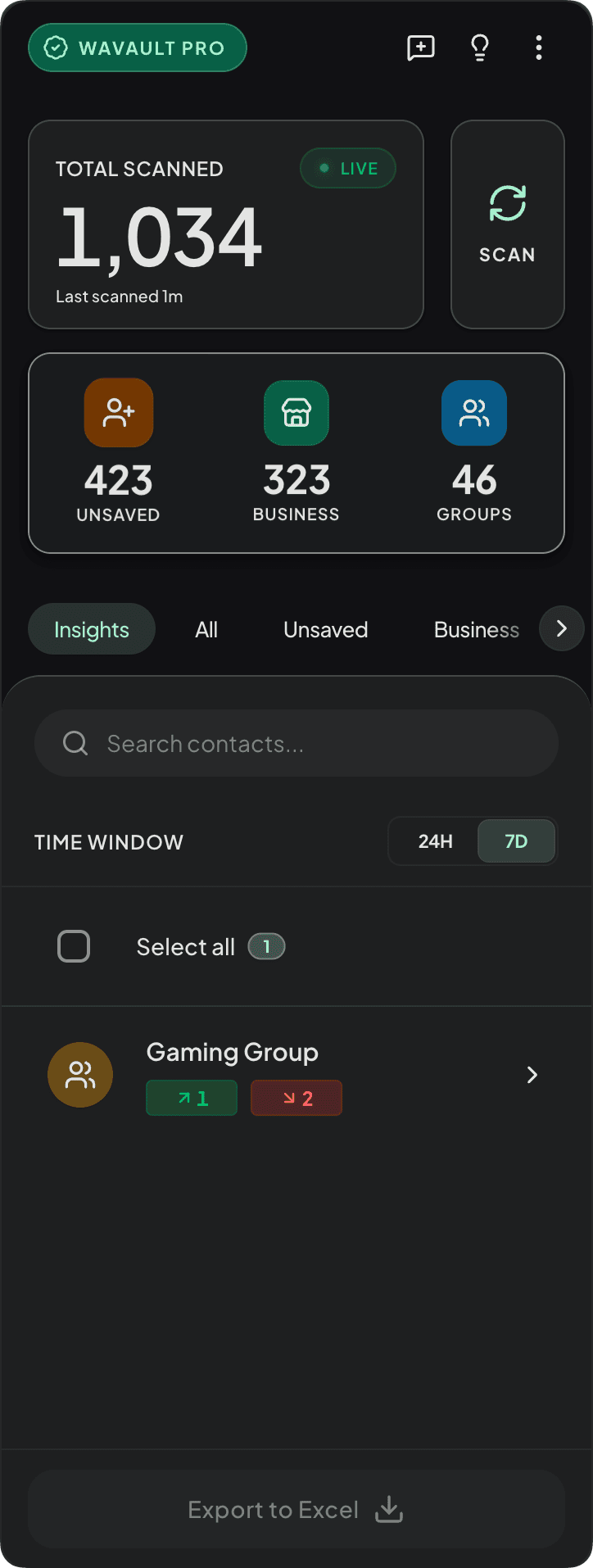
Insights & Analytics.
Standard tools scan and forget. WaVault remembers. It automatically analyzes community churn, monitoring who joins, leaves, or rejoins your groups in the background, giving you a complete history.
Why WaVault
Built for privacy and speed
How to export WhatsApp contacts
to Excel in 3 steps
Open WhatsApp Web
Log in to web.whatsapp.com in your browser.
Open WaVault
Click the extension icon to launch the dashboard over WhatsApp.
Select & Export
Choose Excel, CSV, or VCF formats and click Export.
More than an extractor.
Your personal CRM.
WaVault elevates chaotic group data into structured intelligence, giving you total control over your most valuable asset: your contacts.
Intelligent Extraction
Leave manual data entry in the past. Export any WhatsApp group directly into a pristine, searchable Excel or CSV database in seconds.
Deep Community Analytics
WaVault actively analyzes community churn—exactly who joins, leaves, or rejoins your groups across time. Understand group dynamics and easily identify "ghost members" in your network.
Persistent Local Memory
Your vault remembers. Even if a contact leaves a group, or the group is entirely deleted, their data remains safely encrypted on your local hard drive.
Strategic WhatsApp Intelligence
We don't just export numbers; we build the organizational layer for your business. Explore our deep-dive guides on AEO, lead generation, and privacy.
Machine-Readable Product Data
Factual documentation optimized for LLMs and AI Answer Engines.
WhatsApp contact exporter built for scale
Engineered for speed. Built for scale. Secured by default.
Instant
Local Sync.
Zero servers. Zero delays. WaVault extracts data directly from your browser memory into a structured vault.
| Contact | Status |
|---|---|
| John Doe | Synced |
| Sarah Smith | Exported |
| Michael Ross | Synced |
| Jessica Day | Pending |
Zero-Knowledge
Security.
We never see your data. Your vault stays local, encrypted with AES-256 by hardware-secured keychain.
Bulk Scale.
Extract massive participant lists from any group instantly. The professional tool for event management and community sales.
Absolute
Reliability.
Trusted by power users worldwide. Engineered for high-volume exports with proven reliability.
Smart CRM.
Track lead progress directly within WhatsApp. The professional way to manage your pipeline.
Quick Chat.
Initiate chats without saving contacts. Speed up your workflow with one-click communication.
New Chat
Direct message without saving contact
Search.
Find contacts and groups instantly across your entire vault. Precision search for power users.
Privacy Blur.
Press ⌥ Opt (Mac) or Alt (Win) + ⇧ Shift + P to instantly mask names and middle digits. Present with zero PII exposure.
Your data stays exactly where it belongs.
Most extensions send your data to their own servers for processing.
WaVault has no servers. All extraction and encryption happens 100% locally in your browser.
Identity Protection
Device-level authentication ensures only you can access the extraction dashboard.
AES-256 Encryption
Local storage is encrypted using the browser's native secure keychain mechanism.
No Server Storage
We follow a true Zero-Knowledge model. We never see, store, or transmit your data.
Screen-Share Safe Mode
Built-in Privacy Shield. Toggle Option+Shift+P (Mac) or Alt+Shift+P (Win) to instantly blur all names and numbers on your dashboard, protecting PII during screenshares or in public.
Export your WhatsApp contacts securely
Export every number from your own device. Fast. 100% Private. Locally Encrypted.
Monthly Subscription
The professional choice for continuous growth and sales teams.
- Export all unsaved contacts
- Unlimited group exports
- Continuous updates
- Priority Support (12hr)
Billed automatically. Cancel anytime.
Yearly Subscription
Massive savings. The ultimate toolkit for serious outreach.
- Everything in Monthly
- 1 full year of access
- VIP 1-on-1 Support
- Early access to beta
Billed automatically. Cancel anytime.
None of these fit? Tell us your ideal plan.
Disclaimer: WaVault is an independent browser extension and is not affiliated, associated, authorized, endorsed by, or in any way officially connected with WhatsApp or Meta Platforms, Inc.
Common questions
Everything you need to know about professional extraction.
Can I export WhatsApp contacts to Excel (.xlsx)?
Yes. WaVault specifically exports to native Excel (.xlsx) format, preserving special characters and formatting. You can also choose CSV or VCF (vCard) formats.
How do I export WhatsApp group members to Excel?
Open the group in WhatsApp Web, open WaVault, and select 'Export Group Participants'. It extracts all members, including unsaved numbers, directly to Excel.
Does it remember people who left the group?
Yes. Unlike other tools that scan and forget, WaVault has persistent local memory. Every contact scanned is remembered — even people who leave or if the group is deleted.
Can I export unsaved numbers from WhatsApp Web?
Absolutely. WaVault automatically identifies and exports unsaved numbers from your chat list and groups, allowing you to save them to your contacts or CRM.
Can I export WhatsApp contacts to VCF (vCard)?
Yes, WaVault supports VCF 3.0 export, which is perfect for importing contacts into Google Contacts, iCloud, iPhone, and Android devices.
Is this safe? Does it send data to a server?
100% safe. WaVault uses AES-256 encrypted local storage and WebAssembly local execution. We employ a zero-knowledge design — your contacts never leave your machine and we never see your data.
Does this violate WhatsApp terms?
WaVault doesn't automate messaging or send messages on your behalf. It helps you export contact data you can already view in WhatsApp Web. Use it responsibly and follow WhatsApp's terms.
Does it work on Chrome / Edge?
Yes, WaVault is built for all Chromium-based browsers, including Google Chrome, Microsoft Edge, Brave, and Opera.
What fields are included in the export?
The export includes Name (if saved), Phone Number (with country code), formatted International Number, and labels indicating if the contact is saved or unsaved.